Run Claude Code agents in parallel, and merge the best one
Giving one task to several agents and keeping the best result works well for stubborn bugs and refactors. The free way is git worktrees: a folder and branch for each agent, each running its own Claude Code. Parallex 3.0's Fleet does it for you, seals each lane so it reaches only its own worktree, compares what they did, and merges the one you pick. Part of Parallex Pro: $9.99 once, for up to 5 Macs. The 14-day free trial includes it, on every Mac, with no card.
On this page
By hand, with git worktree
- For each agent, make a worktree on a branch of its own:
git worktree add ../api-lane-1 -b try/lane-1. - Start
claude(orcodex) in each worktree's folder, in a terminal of its own, and give each the same task. - When they're done, compare with
git diff main...try/lane-1, run your tests in each worktree, and merge the one you like.git worktree remove ../api-lane-1tidies up.
Each agent runs as you, though: it can read and change anything you can, not just its worktree. With one agent you're watching, that's usually fine. With several running at once, it's worth containing them.
With Parallex: Fleet
- On an agent workspace's page, choose Start a Fleet, or run
parallex fleet runin Terminal. - Give it the task, the repository and how many lanes; lanes go round the agents you choose, Claude Code or Codex. A check command, like
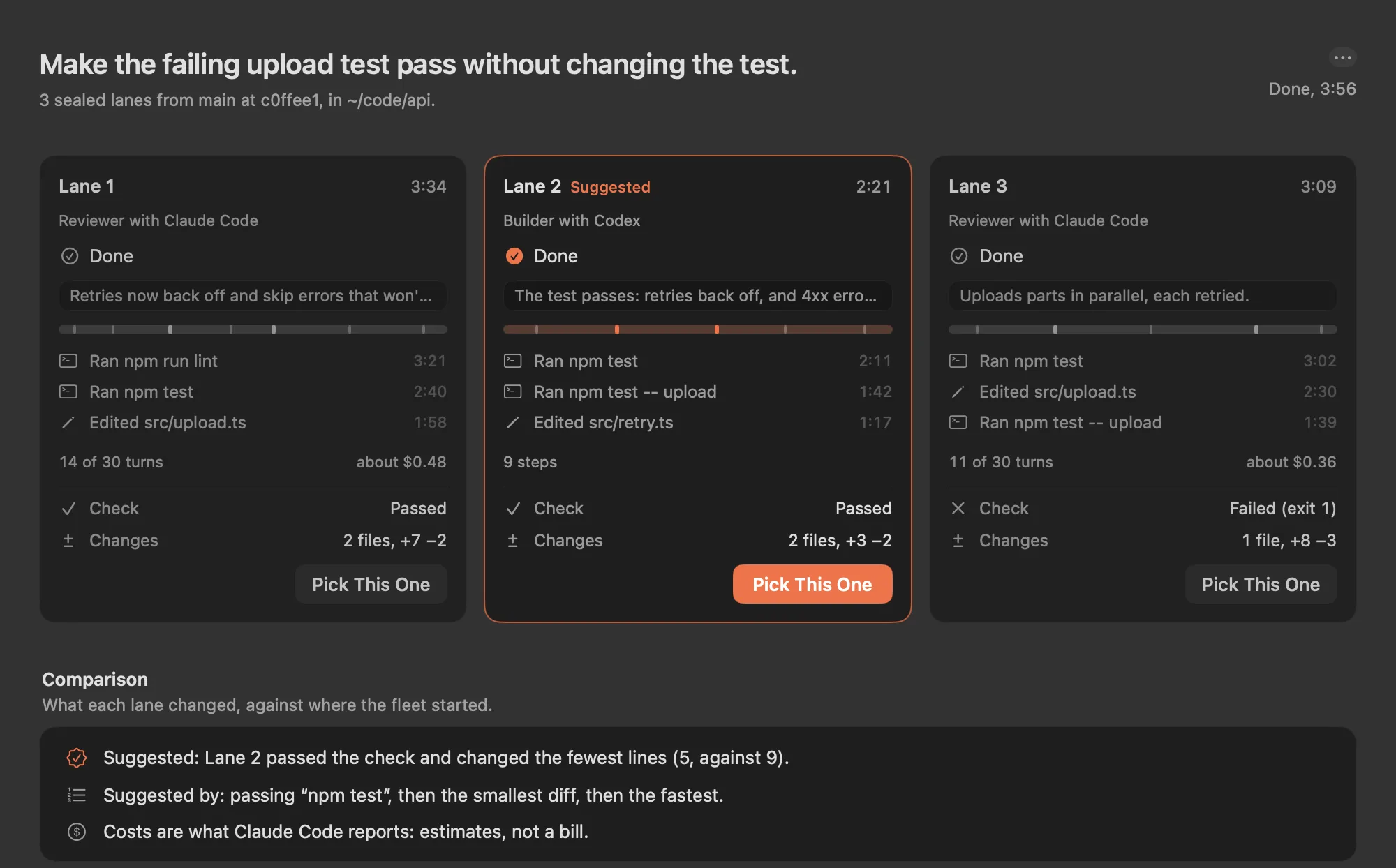
npm test, and caps on turns and budget are optional. - Watch the lanes live. Each works in its own git worktree and branch, sealed so it reaches its worktree and its own copy of its agent's home, and nothing else of yours.
- When they're done, each lane's work is committed on its branch, the check runs in each lane's seal, and one is suggested: passing the check first, then the smallest diff, then the fastest.
- Pick one and merge it: its work becomes one commit of yours, with the task as its message. Keep the other branches to look at later, or remove them.
What it costs
Fleet is part of Parallex Pro. Its lanes run Claude Code and Codex with your own sign-ins, so each lane costs what that run costs on your plan or account, as if you'd run it yourself. Parallex shows Claude Code's own estimate for each lane: an estimate, not a bill.
How many lanes
Parallex suggests a number for your Mac's memory, three on a Mac with 16 GB, between 2 and 6. More than 6 is possible from Terminal when you ask for it.
Sealed, not a virtual machine
Each lane runs the way an agent workspace runs its agent: under the macOS sandbox, with the same kill switch and network proxy. It's not a virtual machine: it's your Mac, with each lane allowed to reach only its own worktree and its own copy of its agent's home.
Questions
Can I run several Claude Code agents at the same time?
Yes. Each needs a folder of its own, or they edit the same files: a git worktree per agent does it. Parallex's Fleet makes the worktrees, seals each agent to its own, and compares the results.
Does Fleet work with Codex?
Yes. A fleet's lanes can be Claude Code, Codex or both, each using its own sign-in.
Is anything merged by itself?
No. Parallex suggests a lane, and nothing is merged until you pick one and confirm.
Is Fleet part of Pro?
Yes. Fleet is part of Parallex Pro, and the 14-day free trial includes it. The agents' own usage is billed to your plan or account, as usual.
Get Parallex
Try it free for 14 days, then a one-time purchase, for macOS 14 and later.
Or in Terminal
curl -fsSL https://parallex.mandip.dev/install | shOr with Homebrew
brew install --cask mandipadk/parallex/parallex