Undo an app update, or roll back an app's data
An app updates overnight and something you rely on is gone, or a sync or an import leaves its data in a mess. macOS has no undo button for that. A Parallex copy has two: it keeps the version it was on when its app updates, so it can go back, with its data as that version left it; and snapshots keep its data, sign-ins included, as it was at a moment you chose, or once a day. Both work on Parallex's copies, not on the app in your Applications folder. In every Parallex, from $4.99 once for up to 3 Macs. The 14-day free trial includes it, with no card.
Facts about other apps checked against their own sites on October 6, 2026.
Go back a version after an update
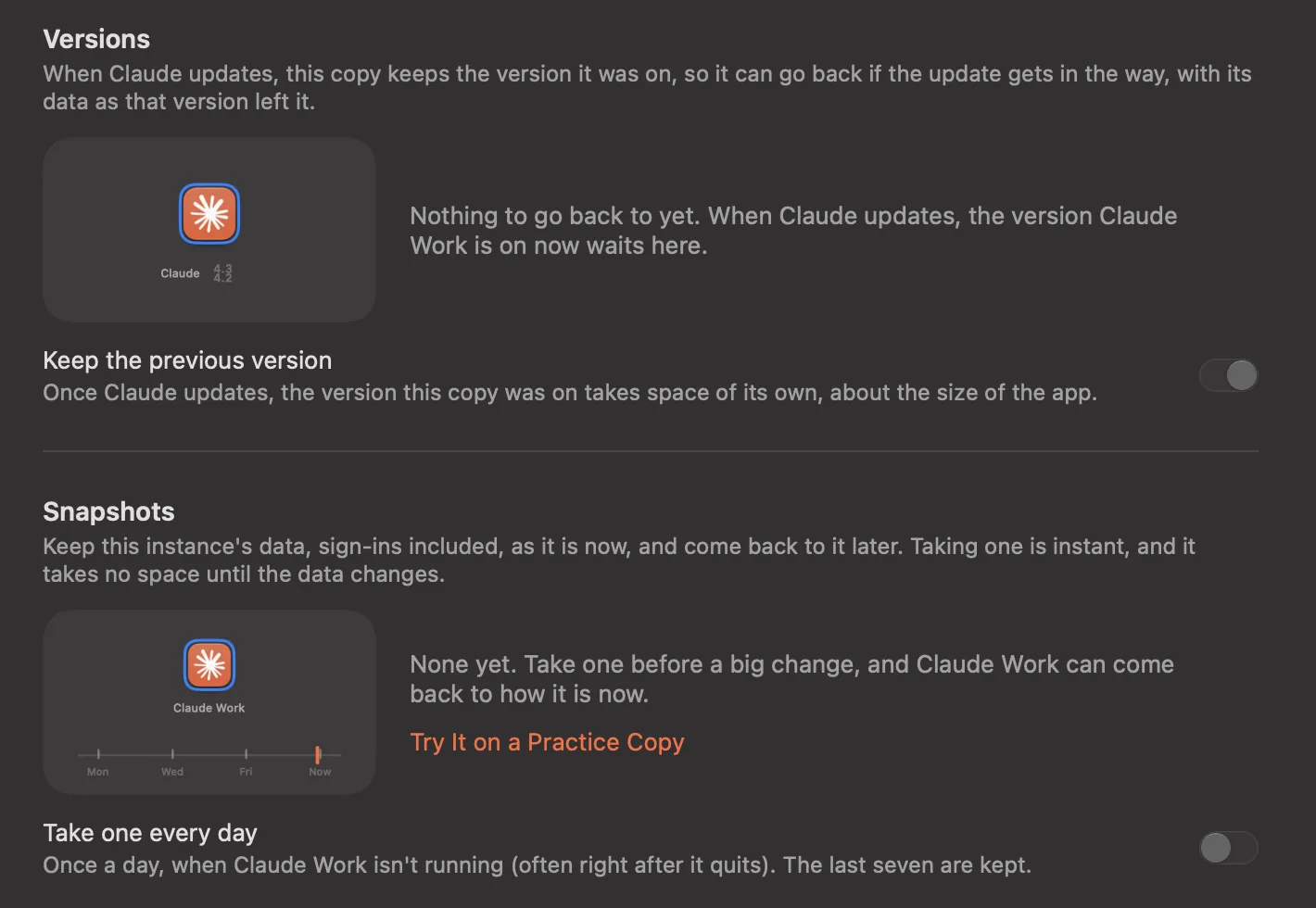
A copy with an identity of its own is built from its app. When the app in Applications updates, Parallex rebuilds the copy from the new version, and first keeps two things: the version the copy was on (a clone of that app, which takes no space until the app updates, then about the app's size) and a snapshot of the copy's data as that version left it, for a copy with its own Library, as copies have by default.
- Quit the copy, open its page in Parallex, and under Versions, choose Go Back… beside the version it was on.
- Choose Go Back, with Its Data to put its data back as that version left it (what it has now is kept as a snapshot), or Go Back, Keep Today's Data to keep it as it is.
- The copy stays on that version when the app updates, until you choose the current one again. Your app in Applications, and your other copies, move on.
parallex versions "Slack Work"
parallex versions use "Slack Work" 4.41.105 --with-data
parallex versions use "Slack Work" --current
Staying on an older version means going without the fixes in newer ones, security fixes included, until you move the copy on; Parallex says so when you go back. Each copy keeps one version before the one it's on, and any it's set to stay on. Keep the previous version on the copy's page turns this off. A plain instance starts the app itself, so it moves with the app: going back a version is for copies with an identity of their own.
Snapshots: an app's data as it was
A snapshot keeps an instance's data as it is: its own folders, its own keychain (so its sign-ins) and a copy's preferences. Taking one is instant and takes no space until the data moves on, because the files are APFS clones. Rewinding first keeps what's there now as a snapshot of its own, so a rewind can be undone the same way.
- Before a big change: take one from the copy's page, the switcher (
snap slack) or Terminal, with a label to remember it by. Yours stay until you delete them. - Every day: turn on Take one every day for a copy. Parallex takes one about once a day, when the copy isn't running (often right after it quits), and keeps the last seven.
- Before an update: taken for you, as above, for each of the last five versions.
- Before a rewind: what the copy had until then, the last five.
The app has to be quit to take or rewind a snapshot: its files change while it runs. Deleting a snapshot moves it to the Trash.
parallex snapshot take "Slack Work" --label "before the reorg"
parallex snapshot list "Slack Work"
parallex snapshot restore "Slack Work" 20260929-201500
parallex edit "Slack Work" --daily-snapshots
Practice first, with nothing at stake
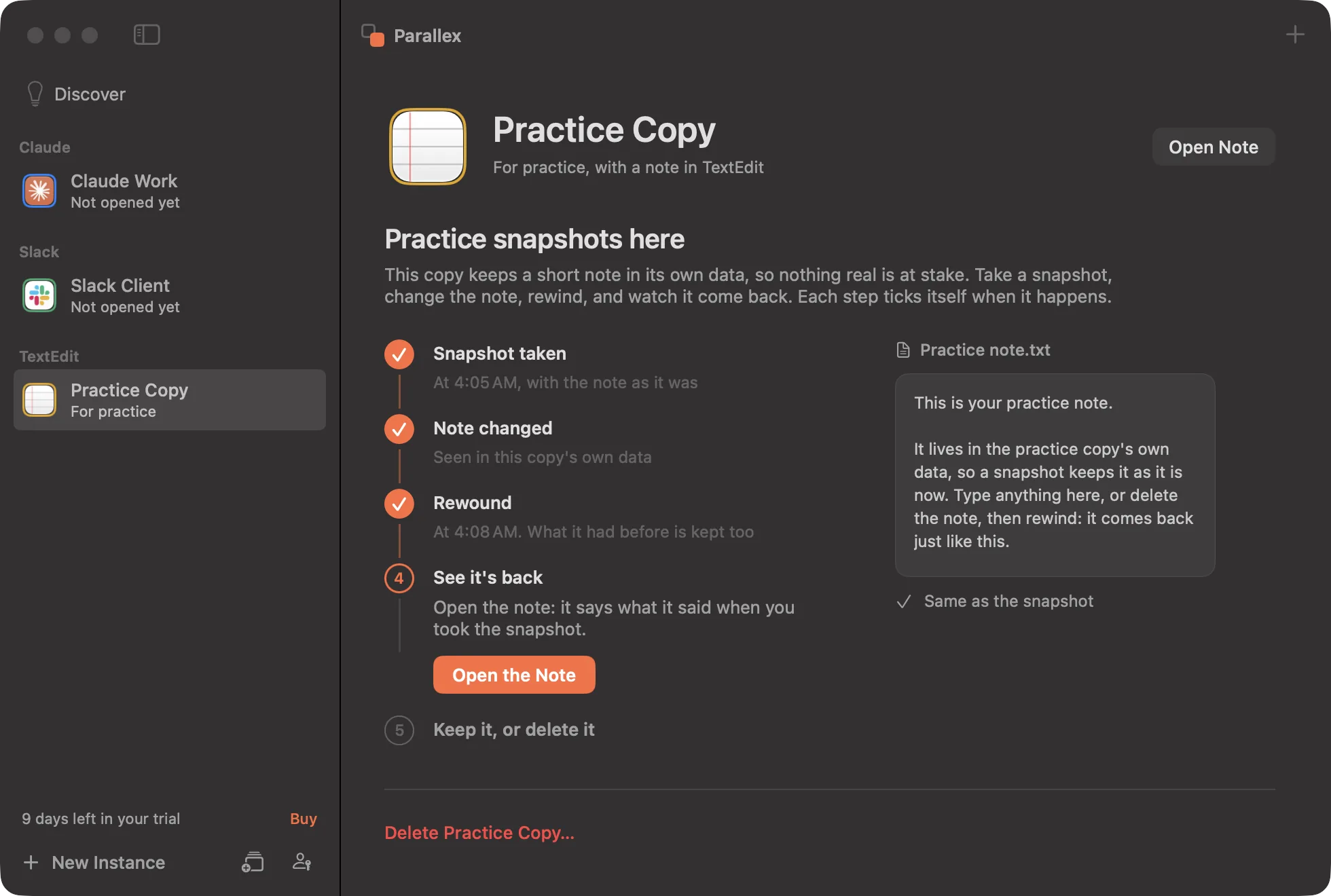
Rewinding real data the first time is nerve-racking. Make a Practice Copy (in the Help menu, the switcher, Discover, and any copy's empty Snapshots list) makes a throwaway instance of TextEdit with a short note in its own data. Its page walks through five steps, and each ticks itself when it really happens: take a snapshot, change or delete the note, rewind, open the note to see it's back, then keep the practice copy or delete it.
Anyone can make one and practice on it, with or without a license, and it never counts as one of your copies. Apple's apps can't be copies with an identity of their own, so it's an instance of TextEdit that opens its note, not a second TextEdit with its own Dock icon.
Without Parallex
For the app in your Applications folder, Time Machine is the way back: it can restore the app, and its data in your Library, from a backup made before the update. Some developers offer older versions to download. Turning off an app's automatic updates (in its own settings, or for App Store apps in the App Store's settings) keeps the version you have until you choose to update.
Parallex adds a way back for each copy on its own, without restoring from a backup or touching the original app.
Questions
Can I undo an app update on a Mac?
macOS has no button for it; Time Machine can restore an older version from a backup. For an app you run as a Parallex copy, the copy keeps the version it was on and goes back to it, with its data as that version left it, from its page or with parallex versions use.
Can I restore an app to how it was yesterday?
Yes, for a Parallex copy with Take one every day on: it takes a snapshot about once a day, when the copy isn't running, and keeps the last seven. Rewinding to one puts its data back as it was then, and what it had before the rewind is kept as a snapshot too.
Does going back change the original app?
No. Versions and snapshots belong to the copy. The app in your Applications folder stays as it is, and so do your other copies.
Do I need a license to go back?
No. Rewinding to a snapshot, and going back to a version that's kept, always work, even after the trial: it's your data. Taking snapshots and choosing which versions are kept need a license or the trial. Neither is a Pro feature.
How much space do snapshots take?
Nothing at first: they're APFS clones of the copy's files. As the copy's data changes, a snapshot takes about as much space as what changed since it was taken.
Get Parallex
Try it free for 14 days, then a one-time purchase, for macOS 14 and later. In Terminal:
curl -fsSL https://parallex.mandip.dev/install | shOr download the disk image, or with Homebrew: brew install --cask mandipadk/parallex/parallex.