Move an app to your new Mac, still signed in
For a whole new Mac, the free way is Migration Assistant: it brings your apps, their data and most sign-ins across at once. Moving one app's account to another Mac, while everything else stays put, is harder: an app keeps its sign-in in your keychain and its data in your Library, and copying the app brings neither. Parallex 3.0's Carry moves a Parallex copy, or a whole workspace, in one encrypted file, still signed in where the app allows it. Part of Parallex Pro: $9.99 once, for up to 5 Macs. The 14-day free trial includes it, on every Mac, with no card.
On this page
A whole Mac: Migration Assistant
On the new Mac, Migration Assistant (offered during setup, and in Applications › Utilities) copies your user account from the old Mac or a Time Machine backup: apps, documents, settings and your login keychain. It's free, and for moving everything it's the right tool. Some apps still ask you to sign in again afterwards, for the reasons below.
One copy, or a workspace: Carry
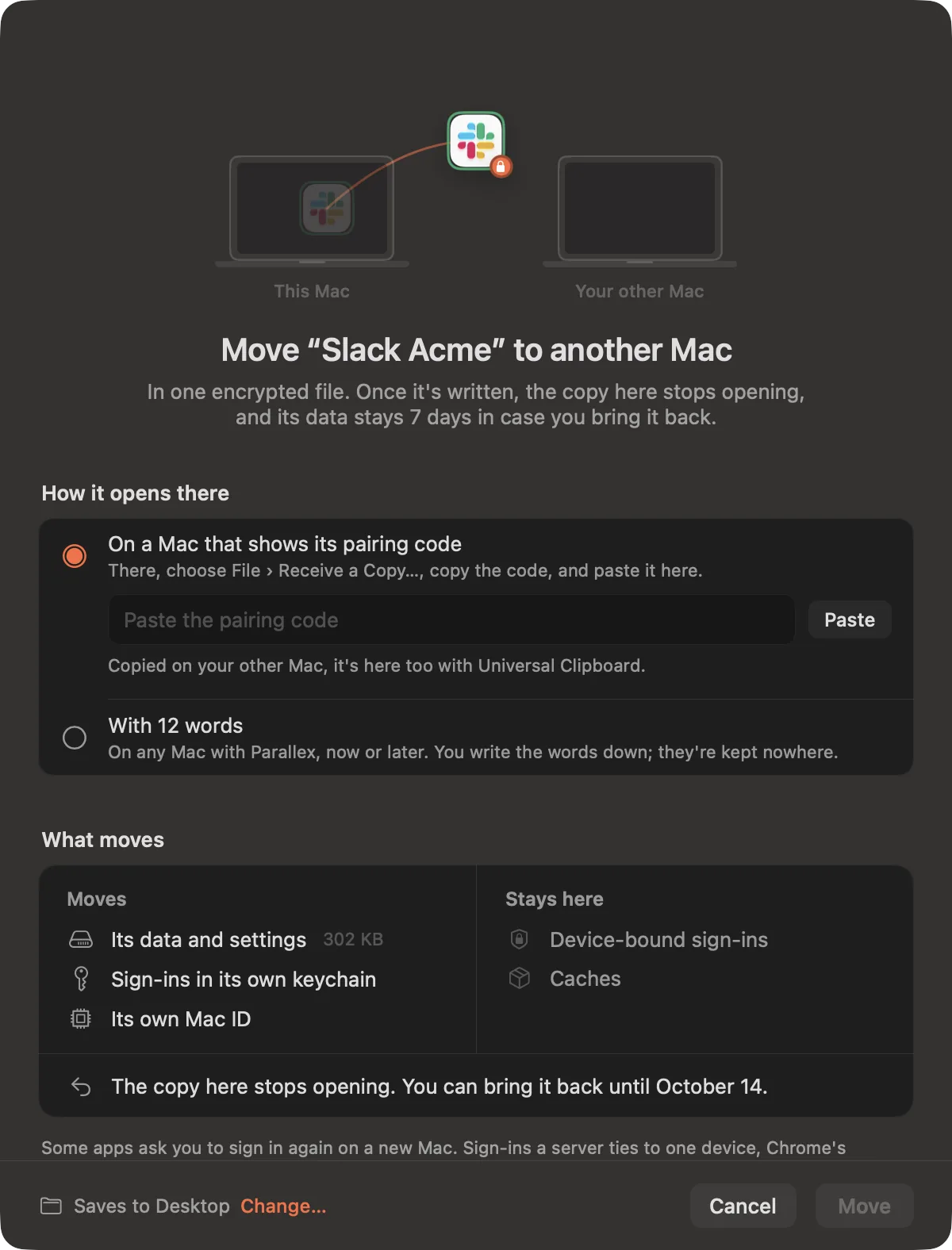
- On the new Mac, in Parallex, choose File › Receive a Copy… and Copy Code. With Universal Clipboard, the pairing code is on your other Mac too. It's good for one file, for a day.
- On the old Mac, choose Move to Another Mac… on the copy's page (or the workspace's), paste the code and press Move. Parallex writes one encrypted file that opens only on that Mac.
- Take the file across however you like, AirDrop or a drive, and drop it on Receive a Copy. The copy is built there from that Mac's own app, with its data, settings and sign-ins.
A move, not a clone
Once the file is written, the copy on the old Mac stops opening, so its sign-ins are only ever in use on one Mac. Its data stays there for 7 days, in case you bring it back with Bring It Back, then goes to the Trash.
- Moves: the copy's data and settings, the sign-ins in its own keychain, and its own Mac ID if it has one.
- Stays: device-bound sign-ins, and caches, which the app makes again.
When an app asks you to sign in again
Some sign-ins can't move, with Carry or any other way: sign-ins a server ties to one device, Chrome's device-bound sessions and keys kept in the Mac's Secure Enclave. Those apps ask you to sign in again on the new Mac; everything else in the copy is there.
No pairing code? 12 words
Choose With 12 words instead, and the file opens on any Mac with Parallex, now or later: to keep a copy aside, or for a Mac you don't have yet. You write the words down; they're kept nowhere.
Good to know
- The new Mac needs the app itself, since the copy is built from it, and Parallex with Pro or its trial.
- Carry moves copies Parallex made. For an app you run without Parallex, Migration Assistant, or installing it and signing in, is the way.
- The file is encrypted with AES-256-GCM; one made for a paired Mac can only be opened with that Mac's own key.
Questions
How do I move an app to a new Mac and keep it signed in?
For everything at once, Migration Assistant brings your apps, data and login keychain, so most apps stay signed in. For one account kept in a Parallex copy, Carry moves just that copy, with its data and its own keychain, in one encrypted file.
Does Carry clone my accounts?
No, it moves them. The copy on the old Mac stops opening once the file is written, and its data is kept 7 days in case you bring it back.
Is Carry part of Pro?
Yes. Carry is part of Parallex Pro, and the 14-day free trial includes it. Sharing a setup as a link, without data, is in every Parallex.
Get Parallex
Try it free for 14 days, then a one-time purchase, for macOS 14 and later.
Or in Terminal
curl -fsSL https://parallex.mandip.dev/install | shOr with Homebrew
brew install --cask mandipadk/parallex/parallex